Dane Poyzer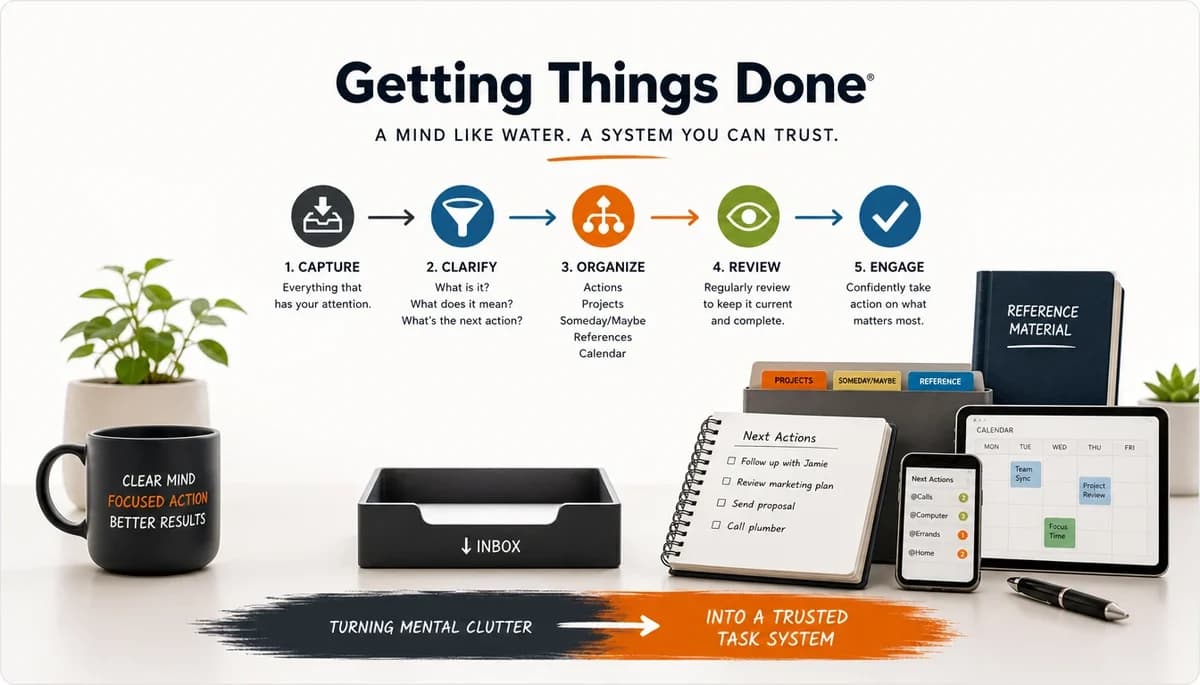
On this page14 sections
If you are not sure what the GTD method is or if you really need another system, you are not alone. Most people do not need more tasks to track. They need a clearer way to decide what each commitment means.
In plain English, the GTD method is a way to get promises, ideas, errands, and half-finished thoughts out of your head and into a trusted process. It matters because it is less about doing more and more about reducing mental clutter when work, life, and loose ends all compete.
At a glance
- What it is: the GTD method is a capture-and-review system for managing commitments.
- Who it helps: people with lots of open loops, mixed responsibilities, or task paralysis when everything feels equally urgent.
- Core idea: your brain is better for thinking than remembering, so you capture, sort, and review work outside your head.
- Best use case: messy workloads, personal admin, side projects, and any situation where a flat to-do list stops being enough.
- Where it fits: it is one of the better-known productivity framework examples, but it is not the only useful one.
Where GTD came from
Getting Things Done was created by David Allen and became widely known through his book of the same name. That matters because the book gave people a shared language for inboxes, next actions, projects, and reviews.
The reason it stuck is practical. It gave knowledge workers a simple way to handle the mess of emails, follow-ups, errands, meetings, and personal admin without treating every item as the same kind of task.
Getting Things Done (GTD), plainly explained in practice


Think of GTD as a system for turning every commitment into something you can capture, clarify, organise, review, and do. The method works best when you stop asking your brain to store reminders and start asking it to make decisions.
That sounds simple, but it changes a lot. A basic to-do list usually mixes errands, ideas, deadlines, projects, and vague worries in one place. GTD separates them, which is why it often feels calmer. Instead of staring at a pile of different kinds of work, you are looking at lists that each answer one specific question.
A few GTD terms are worth knowing before the steps make sense:
- An inbox is where unprocessed stuff lands.
- A next action is the next visible, physical step.
- A project is anything that needs more than one action, even if it is small.
- Waiting for holds things someone else owes you.
- Someday/maybe keeps ideas off your active lists without losing them.
- Calendar is for date-specific actions or commitments.
Those labels matter because they separate different kinds of attention. The method is not just about storing tasks. It is about deciding what kind of thing each item is, so you can trust the right list at the right time.
1. Capture
The first stage is to capture everything that has your attention into a trusted place. That includes tasks, ideas, reminders, emails you need to deal with, personal admin, things you promised someone, and even vague thoughts like “sort holiday plans” or “look into dentist appointment”.
The key point is that capture is not organising. It is just collecting. The goal is to get things out of your head quickly before you forget them or keep rehearsing them mentally.
Good capture usually looks like this:
- you have one or a small number of obvious inboxes
- you can add items quickly without deciding too much in the moment
- you capture often enough that things do not sit in your head for days
- you do not use random scraps, tabs, or mental notes as your real system
A bad capture habit is one where half your commitments are in a task app, some are in email, some are in notes, and the rest are just “things you are sure you will remember”. That is exactly the kind of hidden workload GTD is trying to remove.
In practice, your inbox can be digital, paper, or both. What matters is that it is a temporary holding place, not a graveyard. If you capture everything but never process it, you have just created a more organised mess.
2. Clarify
Once something is captured, the next question is: what is it, really?
Clarifying means taking each item from the inbox and deciding what it means and whether anything needs to happen. This is where GTD becomes more than note collection. It turns raw inputs into decisions.
For each item, you are usually asking questions like:
- Is this actionable?
- If not, should I delete it, keep it as reference, or park it for someday/maybe?
- If it is actionable, what is the very next action?
- If it needs more than one action, is it actually a project?
This is one of the most useful parts of GTD because many people keep tasks in vague forms that are hard to start. “Sort finances” is not yet clear. “Download bank statements for April” is clear. “Deal with website” is vague. “Email designer about homepage copy” is clear.
Good clarification usually means:
- tasks are written in a way that makes action obvious
- projects are identified early instead of being hidden inside single task names
- non-actionable items are removed from active lists
- you spend less time re-reading a task and trying to remember what you meant
A useful test is this: if you looked at the item tomorrow while tired or distracted, would you still know what to do? If not, it probably needs clearer wording.
3. Organise
After you clarify an item, you put it where it belongs. This is the organising stage, and it is where GTD builds the structure that makes the method usable day to day.
This is also where the main GTD lists come into play.
Inbox
The inbox is only for unprocessed inputs. Once an item has been clarified, it should not stay there. A healthy inbox is active but temporary. An unhealthy inbox becomes a second task list full of stale decisions you keep postponing.
What good looks like:
- new stuff lands there quickly
- old stuff gets processed regularly
- you do not keep re-reading the same unclarified entries for a week
Next actions
A next action is the next visible step you can actually do. This is one of the core ideas in GTD. If a task is actionable, but the next step is still fuzzy, you are more likely to avoid it.
Examples:
- “Call landlord about boiler repair”
- “Draft outline for presentation”
- “Buy birthday card”
- “Reply to Sam with revised quote”
What good looks like:
- actions are concrete and startable
- they are small enough to reduce friction
- your list is made of things you could genuinely do, not broad outcomes
Projects
In GTD, a project is anything that needs more than one action. That can sound formal, but it is deliberately broad. “Plan team offsite”, “renew passport”, and “move savings account” can all count as projects if they need multiple steps.
The important point is that projects are outcomes, not single actions. They answer the question “what am I trying to complete?” while next actions answer “what do I do next?”
What good looks like:
- every multi-step commitment is recognised as a project
- each active project has at least one clear next action
- your projects list is a list of outcomes, not a duplicate of your task list
A common GTD problem is keeping a projects list that feels tidy but has no actual next steps attached. That creates the illusion of control without movement.
Waiting for
This list holds items where progress depends on someone else. It could be a colleague, client, family member, supplier, or friend. Instead of keeping those commitments in your head, you track them in one place.
Examples:
- “Waiting for signed contract from client”
- “Waiting for school to confirm term dates”
- “Waiting for accountant to answer tax question”
What good looks like:
- delegated or pending items do not disappear
- you can review follow-ups in one place
- you avoid the feeling that something is moving, while having no record of it
This list matters because many commitments do not require you to act right now, but they still need attention later.
Someday/maybe
This is where ideas go when you do not want to lose them but you do not want them cluttering current work either. It can include courses you might take, books to read, home projects, business ideas, travel plans, or things you are curious about but not committed to yet.
What good looks like:
- useful ideas are preserved without demanding current energy
- active lists stay focused
- you can review possibilities later with a clearer mind
Without a someday/maybe list, people often keep non-urgent ideas mixed in with active commitments, which makes everything feel equally important when it is not.
Calendar
In GTD, the calendar is for things that must happen on a certain day or at a certain time. That includes appointments, hard deadlines, and genuinely date-specific actions.
Examples:
- “Dentist appointment, Thursday 3pm”
- “Submit expenses by 29th”
- “Bring passport to meeting on Friday”
What good looks like:
- only date-specific items go on the calendar
- you trust that what is there really matters on that date
- you do not use the calendar to pressure yourself with arbitrary timing
A common mistake is treating the calendar like a wish list for tasks you hope to do. GTD is stricter than that. If it does not need that day, it usually belongs on a list, not on the calendar.
4. Review
The review stage is what keeps the whole system trustworthy. Without review, even a well-set-up GTD system slowly turns into another pile of stale lists.
There are two main levels here. First, you do small regular reviews as part of normal life, such as emptying inboxes, checking your calendar, and scanning next actions. Second, you do a more complete weekly review.
The weekly review is where you step back and make sure the system still reflects reality. That often includes:
- clearing the inbox
- checking calendar commitments
- reviewing active projects
- making sure each project has a next action
- updating waiting-for items
- pruning or refreshing someday/maybe ideas
- removing tasks that no longer matter
What good looks like:
- your lists match your real commitments
- you trust that nothing important is floating outside the system
- you can look at your next actions without wondering what you forgot
This is why people often say GTD rises or falls with the weekly review. Capture and organising feel useful immediately, but review is what keeps the method alive after the first burst of enthusiasm.
5. Do
The final stage is doing the work, but now you are choosing from a system that has already been clarified and organised. That matters because the decision-making load is lower.
Instead of asking “what is everything I might need to think about?”, you are asking a narrower question like “what can I do now from my trusted list?” That is a much easier decision.
In classic GTD, choosing what to do is often shaped by context, available time, available energy, and priority. Even if you do not follow those categories strictly, the principle still helps: pick from realistic options, not from one giant undifferentiated list.
What good looks like:
- you choose from prepared next actions, not vague intentions
- you can act without re-planning every task from scratch
- your system helps you start, rather than becoming another thing to maintain
This is also where GTD differs from the idea that productivity is just constant motion. The aim is not to be busy all the time. The aim is to know what you are not doing, what you are waiting on, and what the next sensible step is.
What the full GTD rhythm looks like
The whole method works as a loop:
- capture what has your attention
- clarify what each item means
- organise it into the right place
- review regularly so the system stays current
- do the work from trusted lists
That sequence is really the heart of the GTD method. You collect first, decide what something means second, organise it into the right place third, and only then choose what to do. When done well, it reduces hidden work, vague tasks, and the low-level stress of trying to remember everything at once.
The rhythm is simple, even if it takes practice. You capture things often, keep your lists tidy, and review them often enough that you trust them. Once that trust is there, GTD stops feeling like a productivity trick and starts feeling like mental relief.
Strengths and limitations
| Strength | Limitation | What to watch for |
|---|---|---|
| Gets tasks and worries out of your head | Can feel like a lot of sorting at first | Keep the setup simple before adding every list GTD names |
| Gives you a clear definition of a next action | “Next action” can become too granular | Break work down enough to start, not so much that planning replaces doing |
| Works across work and personal life | Weekly reviews are easy to skip | If you stop reviewing, the system stops feeling trustworthy |
| Handles mixed horizons well, from errands to projects | Classic GTD is weaker on priority than many people expect | Add due dates and priorities carefully so everything does not become urgent |
| Reduces the stress of vague commitments | Some people find the labels rigid | Adapt the method to your brain instead of treating it like a rulebook |
Where dypt fits if you want to use GTD
dypt suits GTD well if you want projects broken into clear nested actions instead of kept in flat lists. That is useful when one “project” really hides a chain of smaller steps, reference notes, or follow-ups.
Its deep task hierarchy makes the structure easier to see. You can keep the project at the top, place subtasks underneath it, and still go deeper when a task needs more detail rather than more clutter.
It also helps with parts of GTD that many people find weak in daily life. Features like priorities, deadlines, and reminders make it easier to decide what matters now, while deep task hierarchies and subtasks help you turn vague work into something you can start.
The AI side can help too, with care. AI task breakdown can suggest subtasks, action items, or rough estimates, but you still need to decide what belongs in your trusted system and what does not.
There is a limit here, and it is worth saying plainly. dypt can support your GTD setup, but it will not do the weekly review for you unless you build that habit into your routine.
A simple GTD-style setup in dypt


- Inbox
- Quick-capture tasks, notes, screenshots, and loose commitments that you have not clarified yet.
- Projects
- Example: Plan autumn tax return
- Gather records
- Ask accountant one open question
- Draft submission
- Review before filing
- Example: Plan autumn tax return
- Next actions
- Keep only truly actionable tasks here, with realistic time estimates where useful.
- Waiting for
- Example: Client to send signed contract with a reminder for follow-up.
- Someday/maybe
- Park ideas you do not want to lose without cluttering current work.
- Weekly review
- Add a recurring task to clear the inbox, review projects, check deadlines, and refresh next actions.
When GTD is worth using
GTD is a strong fit when your main problem is too many open loops, unclear next steps, or low trust in your current task system. It is one of the more useful productivity framework examples when life and work are mixed together and a flat list no longer reflects reality.
It is less ideal if you want a very light daily method and know you will not review your system regularly. Without review, even a good system turns into another pile of stale lists.
The best next step is small. Try mapping one real project into an inbox, project, next action, and waiting-for structure before you rebuild your whole life around it.
If you want to try that in a tool built for deeper task structure, explore dypt, start using dypt for free, or dig into the practical details in the dypt docs.
Related resources
If you want to go beyond the plain-English overview, these are some of the most useful GTD resources on the web:
-
Getting Things Done by David Allen
The original book and still the main source for the method's language, structure, and examples. -
Getting Things Done official site
The home of the GTD methodology, with articles, training, coaching, templates, and official explanations. -
GTD Connect
The official GTD membership community, with podcasts, webinars, and deeper material for people who want to practise the method more seriously. -
David Allen Company blog
Useful for practical articles on reviews, capture habits, focus, and common GTD sticking points. -
Todoist guide to Getting Things Done
A popular third-party explanation of GTD that shows how many people adapt the method in modern task apps. -
Reddit: r/gtd
A popular unofficial community where people share real-world setups, ask practical questions, and compare how they adapt GTD across tools and routines. -
Wikipedia: Getting Things Done
A quick overview of the system, its background, and its core terminology if you want a neutral summary before diving deeper.
These are worth using in that general order: start with the book or the official site if you want the method as intended, then look at communities and third-party guides to see how people adapt GTD in real life.