Dane Poyzer
On this page11 sections
Large tasks feel heavy when they live as one line on a to-do list. "Launch the website", "prepare the client proposal", or "sort out the house move" all sound like single tasks, but each one actually contains decisions, dependencies, and smaller pieces of work.
The practical answer is to break the task down before you try to do it. A good breakdown turns a vague project into a sequence of actions you can see, order, and start. This guide is a manual framework for how to break down a project into tasks, with examples you can use in dypt or any other task manager. The same approach works when you need to break down tasks at work, at home, or across a larger project.
Start with the outcome
Before you break down tasks, define what "done" means. This is the guardrail that keeps the breakdown useful.
Ask:
- What has to be true when this task is complete?
- Who needs to review, receive, or use the finished work?
- What would make this feel complete enough, even if it is not perfect?
- Are there deadlines, constraints, or dependencies I need to respect?
For example, "prepare client proposal" is too broad. A clearer outcome is: "send Priya a proposal by Friday that includes scope, timeline, pricing options, and three relevant examples." That outcome gives you material to work with. It also prevents you from adding unrelated subtasks just because they are nearby.
Capture the obvious pieces first
Do not try to create the perfect task tree in one pass. Start by writing down the pieces you already know.
For a proposal, that might be:
- Review discovery call notes
- Confirm the client's main goals
- Draft the scope
- Estimate timeline
- Build pricing options
- Find relevant examples
- Write the recommendation
- Review and send
This first pass is not the plan yet. It is a capture step. The point is to get the work out of your head so you can inspect it. If you are starting from scattered notes, the workflow in From brain dump to task list is a useful companion to this step.
Turn the list into a hierarchy
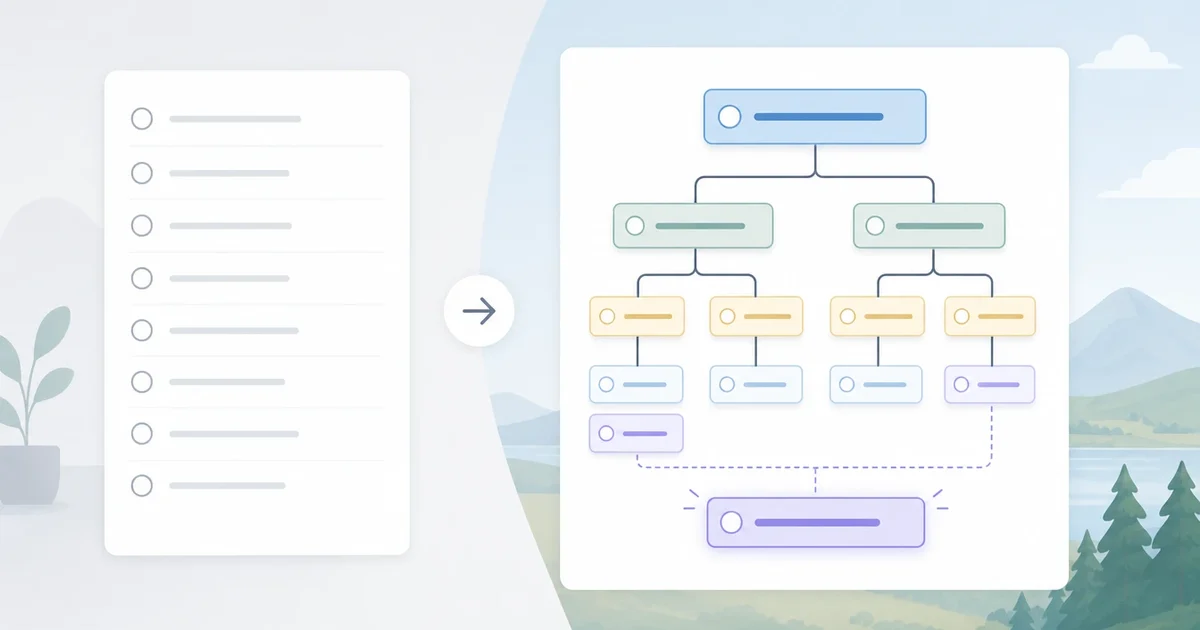
A flat list can still feel overwhelming when every item appears equally important. The next step is to group related work under parent tasks.
A simple task breakdown example might look like this:
- Prepare client proposal
- Understand the client need
- Review discovery call notes
- Pull out pain points
- Confirm success criteria
- Create the proposal structure
- Draft recommended approach
- Outline timeline
- Add assumptions
- Build the commercial section
- Create pricing options
- Check margin and delivery capacity
- Add what is not included
- Finish and send
- Add relevant examples
- Proofread
- Send to Priya
- Understand the client need
This is where dypt is especially useful: parent tasks can hold the shape of the project, while subtasks hold the actual next actions.


A good hierarchy should make the work easier to scan. If the tree becomes harder to understand than the original task, simplify it. Most large tasks only need two or three levels: the project, the main phases, and the actions inside each phase.
Make each subtask actionable
A useful subtask starts with a verb and describes a visible action. "Proposal" is not actionable. "Draft proposal opening section" is actionable. "Research" is vague. "Collect three pricing examples" is clearer.
When you break down a project, look for subtasks that are small enough to start without another planning session. A good rule is: if you would still hesitate when you saw the subtask tomorrow morning, it probably needs to be broken down again.
For example:
- Too vague: Marketing plan
- Better: Draft three campaign themes
- Better still: List five customer problems the campaign should address
You do not need every subtask to be tiny. Some can stay larger if they are obvious to you. The goal is not maximum detail; it is reduced friction. Break down tasks until the next move is clear, then stop planning and start working.
Find dependencies and order
Once the subtasks are visible, ask what has to happen first.
Dependencies usually fall into a few categories:
- One task needs information from another task.
- Someone else needs to respond before you can continue.
- A draft needs review before it can be sent.
- A decision has to be made before the next step is worth doing.
Move dependent work underneath the thing it depends on, or add a note that makes the relationship clear. For example, "send proposal" depends on "confirm pricing options" and "proofread final draft". If those sit far apart in your list, you are more likely to miss one.
This is also the point to separate true blockers from ordinary preferences. "I would rather do this first" is not the same as "this must happen first".
Add priorities, deadlines, and effort estimates
After the structure is clear, add just enough planning detail to guide action.
Use priority to mark the work that most affects the outcome. Use deadlines for real time constraints, not as a way to make every task feel urgent. Use rough effort estimates to spot tasks that are secretly too large.
If a subtask has a long estimate, break it down again. "Write proposal" might be four hours, but "draft problem summary" might be 30 minutes. Smaller estimates make it easier to choose a next step when your day is already busy.


If everything feels urgent, pause before adding more red labels. The article on task prioritization myths covers why treating every task as high priority often makes overwhelm worse.
Choose the next action
A task breakdown is only useful if it helps you start. Once the work is grouped and ordered, choose the next action you can actually do.
The next action should be:
- Specific enough to begin now
- Small enough to complete in one focused session
- Connected to the larger outcome
- Not blocked by another task
For the proposal example, "work on proposal" is still too broad. "Review discovery notes and highlight pain points" is a better next action.
If you use dypt, this is where the hierarchy pays off. You can keep the whole project visible without forcing yourself to look at every subtask at once.
When AI can speed up the breakdown
This article is deliberately focused on the manual method, because you should understand the shape of good breakdowns before outsourcing the first draft. But AI can speed up the process when the task is vague, emotionally loaded, or too large to start.
Use AI when:
- You have a rough task title but no obvious first step.
- You have notes and need possible subtasks extracted.
- You want alternative ways to group the work.
- You need a first draft that you can edit rather than a blank page.
The important part is that AI suggestions are still suggestions. Review them, delete anything that does not fit, and adjust the order based on the actual dependencies. For a more product-led walkthrough, read how AI task breakdown helps turn rough ideas into real next steps.
Keep the plan alive
Large tasks change as you work. You might discover missing steps, remove unnecessary work, or change the order after getting feedback. That does not mean the breakdown failed. It means the plan is doing its job.
Review the task tree at natural checkpoints:
- After finishing a major phase
- When a dependency changes
- Before a deadline review
- When the list starts to feel noisy again
Archive or delete subtasks that are no longer useful. Add new subtasks when the work becomes clearer. A task breakdown should be a working model of the project, not a document you are afraid to touch.
A simple checklist for breaking down large tasks
Use this checklist when a task feels too big:
- Write the outcome in one sentence.
- Capture the obvious pieces without judging them.
- Group related work under parent tasks.
- Rewrite vague items as visible actions.
- Mark dependencies and blockers.
- Add priorities, deadlines, and rough effort estimates only where useful.
- Pick the smallest unblocked next action.
- Review and adjust the structure as the work changes.
That is the core skill: turn a large task into a structure you can move through.
Conclusion
Knowing how to break down a project is one of the most useful productivity skills because it turns uncertainty into visible work. You do not need a perfect plan. You need a clear enough map to choose the next step.
With dypt, you can create parent tasks, add nested subtasks, set priorities and deadlines, estimate time, and keep the full structure connected as the project changes. Start with one large task, break it into phases, choose the next action, and keep refining from there.
If you want a task manager built around this kind of hierarchical planning, start using dypt or learn more about the hierarchical task manager.